Prusa MK3S+ · Volume 5
Projects & Reference — What the Two Printers Make, Specs, and Further Reading
5.1 The role these printers play in the shop
A 3D printer earns its bench space not by making trinkets but by making the shop’s other work possible. That is the honest measure of the two MK3S+ units here: they are less an end in themselves than an enabling tool that feeds the CNC machines, the lasers, and the coil winders. FDM is uniquely good at producing one-off, custom, geometrically-awkward plastic parts cheaply and overnight — exactly the parts a working shop constantly needs and can rarely buy. Two identical machines double that capacity and mean a long print on one never blocks a quick print on the other.
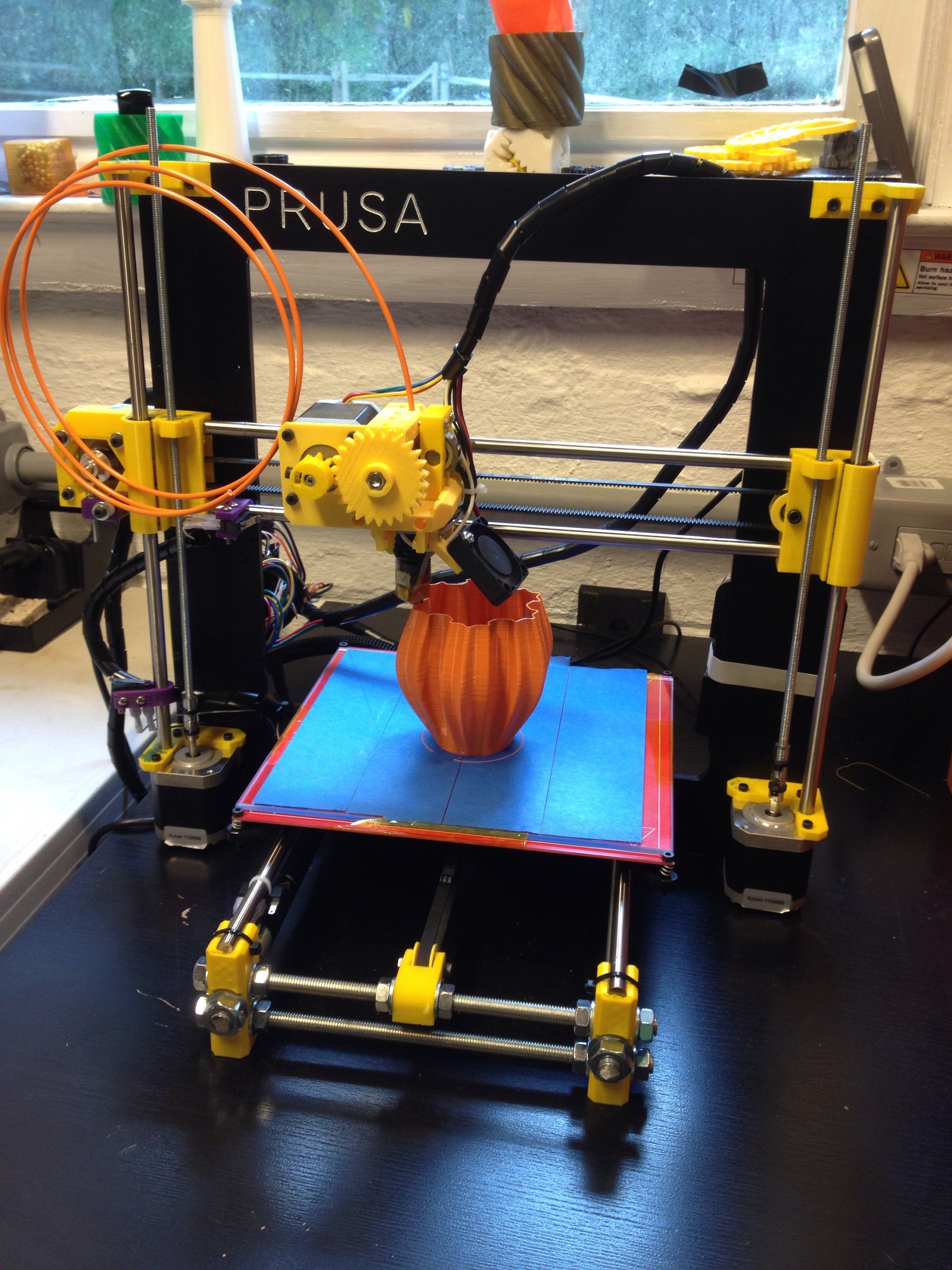
5.2 What they make
The output falls into a few recurring categories, and nearly all of it is functional rather than decorative.
Jigs and fixtures are the largest category and the most valuable. A jig holds a workpiece in a known, repeatable position; a fixture holds it while an operation is performed on it. FDM excels here because every jig is a one-off, its shape is dictated by the specific part it must cradle, and it does not need to be metal. Custom soft-jaw inserts and workholding for the CNC machines, drilling and alignment guides, assembly fixtures that hold parts square while glue or solder sets, and location blocks that make a setup repeatable are all printed to order, refined by reprinting, and thrown away or archived when the job is done. A printed jig that takes an hour to design and prints overnight can save hours of fiddly setup on the CNC or the bench the next morning.
Enclosures, housings, and mounts are the second category — project boxes for electronics, panel-mount brackets, cases for the shop’s own tooling, mounting plates and adapters that let one machine’s accessory fit another. These lean on PETG and ABS/ASA for the heat and impact resistance that room-temperature-only PLA cannot give, which is much of why an enclosed machine matters in a working shop.
Replacement and adapter parts close the loop the RepRap project started: the printers print their own upgrades and spares, and they print adapters, knobs, gears, spacers, and brackets for every other machine in the shop. When a small plastic part breaks or a machine needs a bespoke adapter that no one sells, the answer is usually to model it and print it.
5.3 Why two machines earn their keep
Running a pair of identical printers is not simply “twice the printing,” though it is that too. The deeper value is in the redundancy and the parallelism. A print farm’s whole logic — that identical, dependable machines multiply cleanly — applies in miniature to a two-machine shop. A long overnight print on one machine no longer blocks the quick jig that is suddenly needed in the morning; the second machine takes it. When one printer is down for a nozzle change, a belt, or an experiment with a modification, the shop’s printing capacity does not drop to zero. And because the two are the same machine, a setting, a filament, or a fix proven on one transfers directly to the other, and a part that came out wrong on one can be checked against the other to tell a machine problem from a design problem.
There is also a division-of-labour benefit. One machine can be kept configured for the everyday work — a textured sheet, a 0.4 mm nozzle, PLA and PETG — while the other is set up for a different regime, a larger nozzle for fast chunky parts or a hardened nozzle and an enclosure for abrasive composites and engineering plastics. Swapping a nozzle and sheet takes minutes, but not having to swap at all, because the other machine is already set up the way the next job wants, is a real workflow saving. Two modest, well-understood machines used this way often out-serve one faster machine that must be constantly reconfigured.
5.4 The cross-over to the rest of the shop
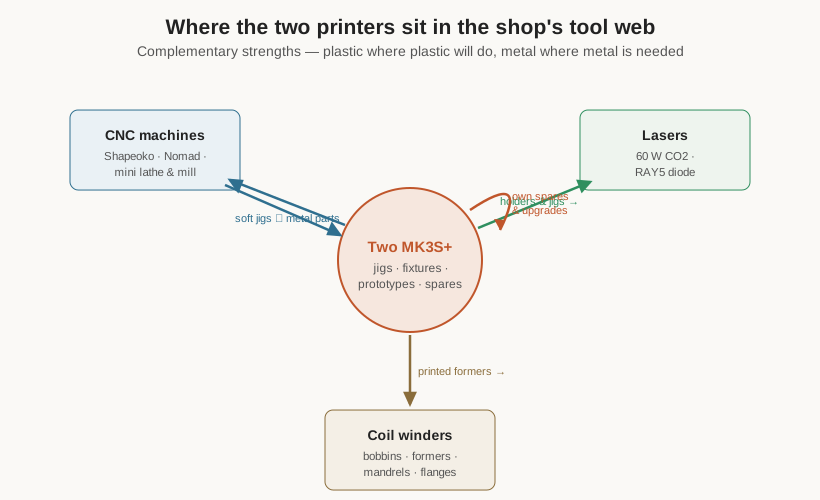
The most interesting work happens where the printers meet the other machines, because their strengths are complementary rather than overlapping. This is worth spelling out, because it is the reason a shop keeps all of these tools rather than trying to make one do everything.
With the CNC machines — the Shapeoko router, the Nomad mill, and the mini lathe and mill — the relationship runs both ways. The printers make the soft things the CNC work needs: custom workholding, soft jaws, dust-shoe parts, alignment jigs, and prototypes that are printed first in plastic to check fit before metal or hardwood is committed. In return, the CNC machines make the things the printers cannot: the rigid metal brackets and plates that a printed part is not strong enough to be, including any machined-aluminium upgrade parts for the printers themselves. Plastic where plastic will do, metal where metal is needed — and the printer is where a design is proven cheaply before the expensive material is cut.
With the lasers — the CO2 and diode engravers — the printers make jigs to hold odd-shaped workpieces flat and located under the beam, alignment fixtures, and holders for the rotary attachments, while the lasers cut and engrave the flat sheet goods and mark the parts that FDM produces.
With the coil winders, the synergy is especially direct: custom bobbins, formers, mandrels, flanges, and end-cheeks for winding coils and transformers are precisely the kind of small, bespoke, dimensionally-specific plastic parts FDM was born to make. A winding job that needs a former of a particular diameter and length gets one printed to size, and the winders’ own documentation on research.fubsypoly.com/electrical-components describes the coil and transformer work these formers serve.
In every case the printers are the fast, cheap, forgiving front end of the shop: the place a part is prototyped, the place the fixtures and jigs that make the other machines accurate are produced, and the place a custom plastic part is simply made when buying one is impossible.
5.5 Specifications summary
The following consolidates the verified specifications of the base Original Prusa i3 MK3S+ referenced throughout these volumes. (Both machines in this shop are modified; these are the stock figures the modifications start from.)
Table 1 — Specifications summary
| Specification | Original Prusa i3 MK3S+ |
|---|---|
| Type | Cartesian (“i3” bed-slinger) FDM / FFF printer |
| Build volume | 250 × 210 × 210 mm (25 × 21 × 21 cm) |
| Layer height | 0.05–0.35 mm (0.4 mm nozzle) |
| Nozzle (default) | 0.4 mm brass; E3D V6-compatible hotend |
| Filament diameter | 1.75 mm |
| Extruder | Direct-drive, Bondtech dual-drive gears |
| Max hotend temp | 300 °C |
| Max bed temp | 120 °C |
| Print bed | Heated; removable magnetic spring-steel sheet, PEI-coated (smooth / satin / textured) |
| Bed leveling | Automatic mesh bed leveling via SuperPINDA inductive probe (temperature-independent, no thermistor) |
| Frame | Anodized aluminium (folded sheet + extrusion Y base) |
| Motion | Smooth rods + linear bearings; GT2 belts on X/Y; dual leadscrews on Z; NEMA 17 steppers |
| Mainboard | Einsy RAMBo (8-bit) |
| Stepper drivers | Trinamic TMC2130 (SPI; StealthChop quiet mode, StallGuard sensorless homing + crash detection) |
| Reliability features | Filament runout sensor, power panic, crash detection, RPM-monitored fans |
| Connectivity | SD card, USB; OctoPrint / Prusa Connect via optional Raspberry Pi |
| Slicer | PrusaSlicer (open source; tuned MK3S+ profiles) |
| Dimensions / weight | 500 × 550 × 400 mm; ~7 kg |
| Power | 24 V, 240 W PSU; auto-detecting mains input |
| Available as | Self-assembly kit or assembled & tested |
| Position in line | Mature final form of the MK3 line; succeeded by MK4/MK4S and the CoreXY CORE One; MK4 upgrade kit available |
Specifications per Prusa Research product and Knowledge Base documentation and reputable community sources; see further reading below.
5.6 Consumables and spares to keep on hand
A shop running two of these machines steadily keeps a small stock of the things that wear or run out, so a failure never idles a printer for want of a cheap part:
- Filament — PLA and PETG as the everyday staples, ABS/ASA for engineering parts (with an enclosed machine), TPU for flexibles, and any fibre-filled composite the work calls for. Kept dry: sealed with desiccant, and dried before use for the hygroscopic grades.
- Spring-steel sheets — at least a smooth and a textured sheet per machine, matched to material and desired finish; they are wear items and warp-sensitive to abuse.
- Nozzles — spare 0.4 mm brass nozzles, plus hardened-steel nozzles for abrasive composites and a larger (0.6 mm) nozzle for fast chunky parts.
- Hotend spares — heat-breaks, PTFE lining, a spare heater cartridge and thermistor; these are the parts a clog or a bad day consumes.
- Consumable hardware — isopropyl alcohol for cleaning the PEI (the single most-used supply), glue stick as a PETG release layer on smooth sheets, the correct rod and leadscrew lubricants, and spare belts.
- Belts and bearings — GT2 belts and LM8UU-type linear bearings as long-interval wear parts.
Further reading
The MK3S+ is one of the best-documented machines in the hobby, and the authoritative sources are all free:
- Prusa Knowledge Base (
help.prusa3d.com) — the first-party manuals, calibration guides, material settings, troubleshooting articles, and the excellent step-by-step assembly and repair guides for every part of the machine. - Prusa Research product pages (
prusa3d.com) — official specifications, the spring-steel sheet options, the SuperPINDA and spare-part listings, and the MK4 upgrade kit. - PrusaSlicer (open source, on Prusa’s site and GitHub) — the slicer itself, its release notes, and its bundled MK3S+ profiles, which are the practical reference for print settings.
- The Prusa community forum and Printables (
forum.prusa3d.com,printables.com) — years of accumulated troubleshooting, tuning discussion, and the vast library of user-designed upgrades and printable parts, most of them free. - The Prusa Bear / Bear Framework project and the broader MK3S+ modding community — for the aftermarket frame and structural upgrades surveyed in the modifications volume.
- RepRap wiki (
reprap.org) — for the open-hardware lineage the machine descends from, and deep background on the i3 design.
Taken together, these five volumes describe the base MK3S+ thoroughly — its lineage and reputation, its mechanics and electronics, its modification ecosystem, its software and materials, and the role it plays in this shop. What remains to be filled in, over time, is the specific character of the two heavily-modified units on these benches: their enclosures, their swapped parts, their network setups, and the photographs of the actual hardware. Those are marked in the modifications volume, and this reference stands as the well-understood baseline they were built up from.
Comments (0)